A switch on every tool
Pretty early on I wanted each tool to have its own little switch to save it for offline, instead of the whole site getting downloaded onto your device. So at the bottom of every tool there's Save for offline, and nothing gets saved until you actually flip it.
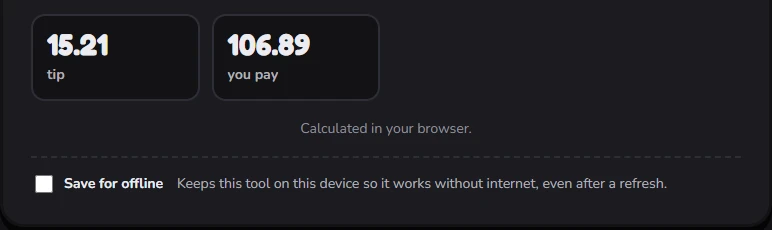 The switch
It's at the bottom of every tool, right under the results.
What flipping it does
It sets up a service worker, which is a little script your browser keeps for the site that can answer requests even when there's no internet. Then it saves that tool's page and every file it needs like the scripts, styles and fonts, plus a tiny copy of the homepage so you can still get back to it.
async function save() {
  await navigator.serviceWorker.register(SW);
  await navigator.serviceWorker.ready;
  await (await caches.open('lsb-tools')).add(page);
  const files = await caches.open('lsb-files');
  await Promise.all(neededFiles().map((u) => keepFile(files, u)));
  say('Saved on this device. Works offline.');
}
It registers the worker, saves the page, then grabs every file the tool loaded. neededFiles() also looks through the tool's own code for library links, so stuff that only loads later when you press a button gets saved too.
Opening it with no internet
When you open a saved tool the worker hands you the saved copy right away, and if you are online it grabs a fresh copy in the background for next time. If you open something you didn't save while you're offline you get a little offline page instead of the browser's dinosaur.
 On my phone with no internet
That's my phone with no internet at all, the bar up top says so. I refresh the QTE Trainer, switch it to touch and play a round, and it all still works cause I saved it.
const tool = await (await caches.open(TOOLS)).match(key);
if (tool) { // saved tool: open instantly, refresh the saved copy in the background
  event.waitUntil(fetch(req).then((r) => store(TOOLS, key, r)).catch(() => {}));
  return tool;
}
That's the part that makes saved tools open instantly. It answers with what's saved, and the fresh copy only replaces it once it actually finishes downloading.
Some tools just can't
Some tools need internet no matter what, like the weather or Live Canvas, so their switch is greyed out with a warning that says why. 54 tools are like that. A few others only need internet for one part, like the PubChem button on the Molecule Builder, so they keep the switch and just warn you about that part.
Turning it off
If you turn it back off it deletes that tool again, and once you turn off the last one it cleans up everything it saved, so there's nothing left sitting on your phone.
I also wanted a button to clear the site's cache cause clearing it on my phone is a pain. So there's a Clear site data page that only touches this site, and you pick what goes, cached pages, favorites, tools saved for offline or stuff tools saved.
It only saves stuff from the site and the couple places it pulls libraries and fonts from, so saving a tool isn't gonna eat like 100 MB of your storage.